 tangzily
Open, reconcile, and close a shift
Record the opening float and reconcile the cash drawer at close.
Who can use this
Shift operations require an active connection and register access.
Instructions
- In Register, select Open shift and enter the cash in the drawer.
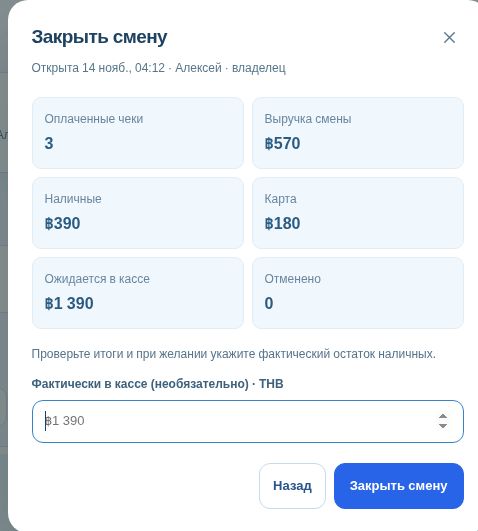
- At the end of the shift, complete or cancel open table and counter orders. Select Close shift and enter the counted cash.
- Check the difference. In Shift history, open the shift to compare the saved closing totals with sales as they stand now.

Buttons and fields
- Open shift
- Start a shared shift and enter the opening cash.
- Details / Shift history
- Open the current or a previous shift and review its receipts.
- Close shift
- Open the count and confirmation form.
- Actual cash
- Enter the physically counted cash at close.
- At close
- Show the settlement recorded when the shift closed.
- Sales now
- Show current totals including subsequent voids.
- Refresh / Retry
- Load current data or check an operation after a connection error.